Beta — Free to Use

Capability Modeler Turns a Spreadsheet Into an Editable PowerPoint Map

The flagship tool in the Useful EA suite — practical, browser-based tools for architects who need real output, not another platform to administer.

Free during beta — no credit card required.

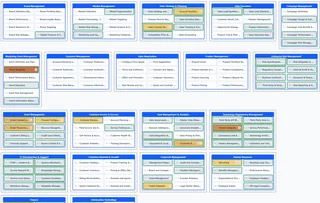
Capability Modeler canvas showing a populated business capability model, organized into labeled groups such as Brand Management, Sales Strategy & Planning, and Enterprise Risk Management, with maturity heatmap coloring and priority badges on individual capabilities.

An actual Capability Modeler canvas — not a mockup.

Why Useful EA

Practical Tools, Not Platforms to Administer

Most enterprise-architecture software is priced and built for procurement committees, not the architects using it every day. Each Useful EA tool is scoped to one job, runs entirely in your browser, and produces something you can hand to a stakeholder in the same meeting — a slide, a report, a plan — instead of a platform you have to administer.

Capability Modeler

See What It Produces

Import a capability inventory from a spreadsheet, arrange it visually, and export it as a real, editable PowerPoint slide — every group and capability is a native shape you can recolor, resize, and drop into your own template.

Visit the Capability Modeler Page →
A capability model exported from Capability Modeler, open and editable in PowerPoint, showing capability groups such as Brand Management, Sales Strategy & Planning, and Enterprise Risk Management as native, individually colored and selectable PowerPoint shapes.
The Rest of the Suite

Independent Tools, Same Audience

Each tool below solves one specific problem for enterprise architects and works independently of the others. They share a sign-in system and a philosophy — use only the one that helps you today.

I am so tired of expensive Enterprise Architecture tools that don't do the things I want. I want tools that do the boring work — like laying out a model I can actually hand to someone.
— Nick Malik, the Enterprise Architect building this

Useful EA is built and operated by Nick Malik through CTO Resources LLC, a Washington State company. See the Terms of Service for the full legal details.

Trust & Beta Status

What's True Right Now

The whole suite is in beta. Here's exactly where things stand.

  • Free to use while the suite is in beta — no credit card required.
  • Sign in with just an email address, across every tool.
  • Your connection to every tool is encrypted (HTTPS).
  • Export your data as CSV or PowerPoint at any time — nothing is locked into a proprietary format.
  • Features may still change during beta, and beta pricing won't continue indefinitely — see the Terms of Service for the full terms.

Questions or issues? Email support@useful-ea.com.

Ready to See It for Yourself?

Import a capability spreadsheet and see what Capability Modeler does with it.