Practical Tools for Enterprise and Business Architects

Turn Architecture Work Into Decisions People Can Act On

Useful EA supports the architecture work behind strategic change—from capability planning and application rationalization to cloud-migration planning, AI adoption, and strategy execution.

Use one focused tool for one immediate problem, or combine them as the work moves from strategy through capabilities, investments, applications, technology, and delivery.

Every plan starts with a 30-day free trial — cancel before it ends and you won't be charged. See pricing →

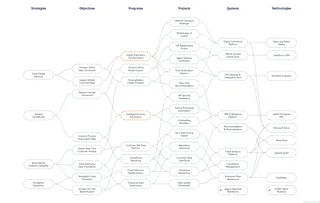
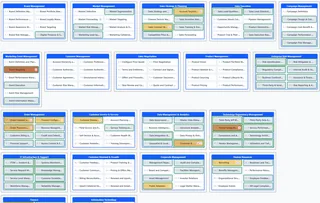
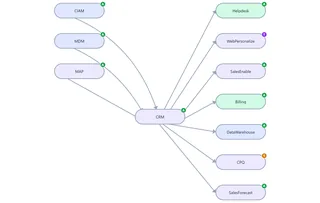
From architecture chaos to action. The three panels are real output from Benefit Dependency Network, Capability Modeler and Application Portfolio Manager, using synthetic data. The tools are separate applications.

Solutions

Start With the Architecture Work in Front of You

Enterprise architecture is not one activity. Useful EA provides focused tools for several of the recurring jobs that enterprise and business architects are asked to perform.

Strategic change scenarios

When the organization is deciding what to change, and why.

AI Adoption Planning

Move from a collection of promising AI ideas to an adoption plan grounded in business need. Connect proposed AI initiatives to strategic outcomes, identify the capabilities they depend on, assess gaps across people, process, information, and tools, and map the applications and technologies that must change.

Turn the resulting gaps into coordinated investment programs with clear objectives and measurable results.

Support from: Benefit Dependency Network, Capability Modeler, Architecture Repository, and Application Portfolio Manager

Explore AI Adoption Planning →

Cloud-Migration Planning

Understand the application landscape before deciding what moves, what changes, and in what sequence. Use application dependencies, capability alignment, dispositions, custom portfolio information, and scheduled work items to support migration planning.

Support from: Application Portfolio Manager and Architecture Repository

Explore Cloud-Migration Planning →

Strategy to Execution

Trace strategies through objectives, benefits, programs, projects, systems, and technologies. Surface proposed work that lacks a clear strategic connection, then turn strategically important capability gaps into candidate programs for planning and funding.

Support from: Benefit Dependency Network and Capability Modeler

Explore Strategy to Execution →

Core architecture practices

The ongoing work of an architecture practice.

Capability Modeling and Realization

Build or import a business capability model, connect capabilities to strategy, assess maturity gaps, identify priorities, and organize important gaps into proposed investment programs with objectives and measurable results.

Support from: Capability Modeler

Explore Capability Planning →

Application Rationalization

Decide which applications should be retained, modernized, consolidated, replaced, or retired. Relate applications to the capabilities they support, understand their dependencies, record the chosen disposition, and turn the decision into a dated list of work.

Support from: Application Portfolio Manager and Capability Modeler

Explore Application Rationalization →

Application Portfolio Management

Maintain a working catalog of applications, owners, lifecycle states, business-capability relationships, upstream and downstream application data flows, reviews, and change work. Keep the portfolio useful after the initial assessment is complete.

Support from: Application Portfolio Manager and Capability Modeler

Explore Application Portfolio Management →
How the Work Connects

Follow the Work From Strategy to Change

Useful EA tools work independently, but the architecture questions are connected. Begin with the question you need to answer today, then bring in another tool when the work moves into a different architecture domain.

  1. Strategy and outcomes Benefit Dependency Network strategies Capability Modeler strategy links
  2. Objectives and benefits Benefit Dependency Network objectives, benefits and delivery dependencies
  3. Capabilities and maturity gaps Capability Modeler capabilities, maturity gaps and priorities
  4. Programs and investments Capability Modeler programs and OKRs Benefit Dependency Network programs and projects
  5. Applications and technologies Application Portfolio Manager applications and application dependencies Benefit Dependency Network systems and technologies
  6. Migration, rationalization and change work Application Portfolio Manager dispositions and change work

Across every stage: Architecture Repository

Structured concepts and relationships across architecture domains, kept consistent by a metamodel you choose or define. Repository →

Alongside the work: EA Maturity Assessment

Improvement of the architecture practice itself: assess the practice against a maturity model and track an improvement plan. EA Maturity Assessment →

The tools are separate applications that share one sign-in. Application Portfolio Manager can map each application to capabilities in a model you build in Capability Modeler; otherwise, each tool keeps its own data, and every tool exports it.

Capability Modeler

Find the Gaps. Fund the Right Ones.

Capability Modeler structures the evidence behind an investment decision. It records how mature each capability is today and needs to be, calculates a priority from the size of the gap and the strategies that depend on it, and helps you organize the most important gaps into proposed programs. The funding decision stays with you and your stakeholders.

  • CSV import with column mapping
  • Capability hierarchies up to five levels deep
  • Strategy mapping
  • Current and desired maturity
  • Priority calculation
  • Candidate portfolios, side by side
  • Proposed programs
  • Objectives and key results
  • Editable PowerPoint, image and CSV exports
Visit the Capability Modeler Page →
A capability model exported from Capability Modeler, open and editable in PowerPoint, showing capability groups such as Brand Management, Sales Strategy & Planning, and Enterprise Risk Management as native, individually colored and selectable PowerPoint shapes.
A capability map exported from Capability Modeler, open and editable in PowerPoint. Synthetic data.
The Tools

Focused Tools for Connected Architecture Work

Each Useful EA tool is designed around a specific architecture job. Use only the tool you need, or combine them when an engagement spans several kinds of analysis.

Live — Beta
Capability Modeler
Build a business capability model, score maturity gaps against strategy, and turn the priorities into proposed investment programs with OKRs.
Explore Capability Modeler →
Live — Beta
Application Portfolio Manager
Catalog every application you run, visualize the data flowing between them, and schedule the work items each one needs when it changes disposition.
Explore Application Portfolio Manager →
Live — Beta
Benefit Dependency Network
Map how strategies create demand for objectives, programs, projects, systems, and technologies — and spot what lacks alignment.
Explore Benefit Dependency Network →
Live — Beta
EA Maturity Assessment
Assess your EA practice against the maturity model that fits, identify important gaps, and create a structured improvement plan.
Explore EA Maturity Assessment →
Live — Beta
Architecture Repository
Build a structured enterprise repository around an available metamodel or one you define. Capture typed elements and relationships, validate the model, explore focused viewpoints, and export your work.
Explore Repository →
Live — Beta
Metro Map Modeler
Describe high-level and continuous processes as a metro map people can read: each journey a line, each recognizable sub-process a station, shared stations as interchanges.
Explore Metro Map Modeler →
Live — Corporate
ARB Workflow
Find the programs that need architecture review, collect what's missing from their owners, decide relevance with an explained recommendation, and run design and go-live reviews with conditions and sign-offs.
Explore ARB Workflow →
Programs

Use Useful EA in Your Practice or Classroom

Consultants

Use Useful EA for a defined consulting engagement without asking the client to purchase a large permanent architecture platform at the beginning. Choose a three- or six-month engagement, complete the work, and then export the client’s data or help the client continue with its own subscription.

Free during the beta. Consultants are approved before their first engagement, and the client’s named contact controls the consultant’s access.

Explore the Consultant Program →

Educators

Use professional enterprise and business architecture tools during a course. Create a class, provide students with a course code, and review the models they create during the teaching period—without replacing the institution’s learning-management system.

Free during the beta. Educators are approved before their first course; students use their own accounts.

Explore the Educator Program →
Pricing

One Subscription, Every Available Tool

Every plan includes the full Useful EA suite — not a stripped-down tier. Start with a 30-day free trial; cancel any time before it ends and you won't be charged.

Individual
$18/mo + tax
or $180/yr — save 2 months
Corporate (25 seats)
$100/mo + tax
or $1,000/yr — save 2 months

See Full Pricing & Feature Comparison →

Useful-EA provides excellent tools to quickly map out your organization and its interdependencies. Helps me understand where my team is currently and where we need to go to meet our goals.
— Founder & Principal Advisor for AI and SaaS
Trust & Beta Status

What's True Right Now

The whole suite is in beta. Here's exactly where things stand.

  • Every plan starts with a 30-day free trial — no charge until it ends, and you can cancel before then.
  • Sign in with just an email address, across every tool.
  • Your connection to every tool is encrypted (HTTPS).
  • Export your data at any time — nothing is locked into a proprietary format. Every tool exports CSV; Capability Modeler, Benefit Dependency Network, Application Portfolio Manager and EA Maturity Assessment also export PowerPoint, and Architecture Repository exports JSON.
  • Features will change while the suite is in beta and likely will continue to change as we improve. Your data will be protected so that we do not lose anything as the product evolves.

Questions or issues? Email support@useful-ea.com.

Begin With the Question You Need to Answer Today

Pick the architecture work in front of you, then open the tool built for that job. Each tool works on its own.